Showing posts with label Governor Limits. Show all posts

Friday, August 27, 2021

Things to avoid in APEX (Part-1)

We all strive to write APEX in the best way possible and in this post I will cover few unique guidelines that will help to make your code perform better.

1. Initialization of List

If the ask is to write a SOQL Query to fetch the accounts and store them in a list, 8 out 10 developers will write like below.


We all tend to initialize a list, so that it won't be null.  But that's actually causing more harm by consuming more resources.  We must know that SOQL Query will always return a List of subject which is instantiated.  So in our scenario we are actually doing a shallow copy of the records from the list that was returned from SOQL to the list we created.  So if you get 5,000 records as part of your SOQL, you are copying all the 5000 to your list which is not at all required.  We can avoid the explicit initialization to get rid of the shallow copy by having the logic like below.


PS : Remember that initialization cannot be ignored all the time, but only for few specific scenarios as mentioned above

2. Fetch fields without mentioning them in SOQL

If there is a requirement to fetch the Id and Name of an account, most of us will write the SOQL like below :


But what if I tell you that Id field is not required to be explicitly mentioned in the SOQL Query and will be queried automatically.  Along with the ID, RecordTypeId is one field which is also available for you. 


Also not just this, when there is a relation among objects and your SOQL is on the child object, no matter whichever field you query from the associated parent record, parent record Id will be automatically fetched.


So while writing your SOQL's, have in thoughts that there are few fields available even without querying. 

3. Get value of Formula Field without any DML / SOQL

There could be multiple instances where we do the DML first so that the formula field gets populated and then query for it to use in our logic.  To elaborate my point, let me take an example.  Consider a scenario where there is an object by name "Measurement" and is having 3 fields Length (Number), breadth (Number) and Area (Formula). The area is a formula field which holds the value of length multiplied with breadth. So, in-order to get the value of area, we need to first insert a record and then write a SOQL like below. 


But we can completely avoid writing SOQL and DML for getting the value of the formula field by leveraging a pre-defined method called "recalculateFormuals".  In the below example I have no SOQL/DML but able to get the value of formula field for an un-inserted record on the fly. 


The above approach will be very helpful while writing test classes.

Reference : https://developer.salesforce.com/docs/atlas.ja-jp.apexcode.meta/apexcode/apex_class_System_Formula.htm

4 Replace .size() with .isEmpty() wherever applicable

Prior to performing any DML or SOQL where a collection variable is being used, we follow the practice of checking the size of collection to avoid un-necessary SOQL / DML.  


But we need to understand whenever. Size () is used, the processor should traverse through each and every item of the collection for getting the count, but whereas isEmpty() will just check for the very first record in the collection and if found, it returns true, else false. 

So now the time that is consumed by the method. Size () for a collection size of 10000 will be very higher (as it has to traverse through every item present) than the time consumed by the method. IsEmpty() (As the check is made only the very first record).  So whenever you are using. Size () > 0, replace it will. IsEmpty () to avoid time


 Hope you find this interesting.  There are still many points to add and I am planning to post part-2 of this soon.  Let me know in the comment section if you have any such tips.  Feedback is much appreciated and thanks for being an awesome reader.  


..Bazinga..

Friday, August 6, 2021

SOQL query on Custom-Metadata counts against Governor Limits ?

We all have been using custom metadata types in various instances as it is so advantageous over List custom-settings.  Be it the availability of more field types or page-layouts or List Views.  Gotta admit that Custom-Medatadata is obviously a goto place over list custom setting.  But many developers tend to write a SOQL for fetching a record from custom-metadata with a conception that SOQL on CustomMetadata won't count against governor limits.  

Yes, SOQL on Custom Metadata won't count against Governor Limits if and only if you are not querying for a field of type "Long Text Area".  But if your query includes a field of type "Long Text Area", then it is counted against SOQL Governor Limits.   

Let us understand it better with the below example..

There is a custom metadata with API name as "cmd__mdt" and is having two Custom fields 

  1. Status (Status__c) of type "Picklist".
  2. Description(Description__c) of type "Long Text Area"
      

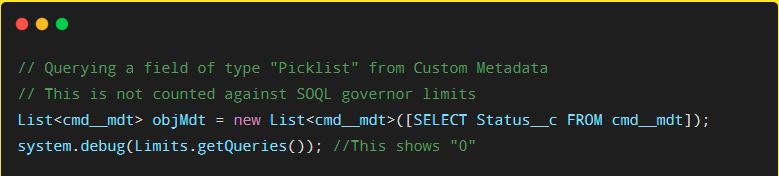
Let us write a SOQL to fetch the "Status__c" field from Custom Metadata.  This query won't be counted against Governor Limits and so we are good here.

Now when we write similar SOQL to fetch the "Description__c" from metdata, this query counts against the governor limits and this is where we have to look at.


Refer to the below link for few such other limitations
https://help.salesforce.com/articleView?id=sf.custommetadatatypes_limits.htm&type=5

The main motivation for us to use Custom Metadata and query over it is that it wont count against SOQL Governor Limits, but with this limitation it sounds more like an impediment now.  

Fortunately from Spring'21, we are able to access Custom Metadata by using static methods but not by using SOQL.  Look at the below snippet


Just like custom setting, we have some static methods to access the data in custom-metadata and as there is no SOQL written here, so no worry on SOQL Governor Limits.  You can use these methods in your Apex Class by upgrading the API Version to latest one, else it might throw an error, as this was released recently and not available in the older API versions.  

It is suggested to replace SOQL on Custom Metadata with static methods available and have no worry on the SOQL Governor Limits.   Happy Coding..

Methods available for Custom metadata are present in the below link.  

https://developer.salesforce.com/docs/atlas.en-us.apexref.meta/apexref/apex_methods_system_custom_metadata_types.htm

Hope you find this interesting and feedback is much appreciated

...Bazingaa...